1. 개요
최근 LG에서 thinqconnect 파이썬 모듈을 발표했음을 확인했습니다. 이를 활용해 집에 있는 LG 가전들의 상태를 Smartthings로 불러오는 작업을 해보았습니다.
2. 구성도
집에 있는 라즈베리파이에 아래와 같이 구성을 할 예정입니다.
thinqconnect <-> MQTT <-> SmartthingsSmartthings의 MQTT 처리는 지난 공휴일 스위치 만들기에서 사용한 MQTTDevices를 활용할 예정입니다.
3. thinqconnect 설치 및 테스트
thinqconnect를 먼저 설치해봅시다. 저의 경우 venv로 가상환경을 만들어 작업을 진행하였습니다.
pi@raspberrypi:~ $ python -m venv .test
pi@raspberrypi:~ $ source .test/bin/activate
(.test) pi@raspberrypi:~ $ pip install thinqconnect
그리고 thinqconnect 모듈 사이트의 예제 코드를 실행해봅시다. thinqconnect : https://pypi.org/project/thinqconnect/
import asyncio
from aiohttp import ClientSession
from thinqconnect.thinq_api import ThinQApi
import uuid

client_id = str(uuid.uuid4())

async def test_devices_list():
    async with ClientSession() as session:
        thinq_api = ThinQApi(session=session, access_token='your_personal_access_token', country_code='KR', client_id=client_id)
        response = await thinq_api.async_get_device_list()
        print("device_list : %s", response)

asyncio.run(test_devices_list())
위 예제 코드 실행을 위해서는 토큰이 필요한데 토큰은 아래 사이트에서 발급 받습니다.
토큰 발급 : https://connect-pat.lgthinq.com/tokens
4. MQTT 서버 설정
라즈베리파이에 MQTT Broker와 파이썬용 MQTT 모듈을 설치합니다.
(.test) pi@raspberrypi:~ $ sudo apt install mosquitto mosquitto-clients python3 python3-pip
(.test) pi@raspberrypi:~ $ pip install paho-mqtt
그리고 정상적으로 동작하는지 확인합니다.
pi@raspberrypi:~ $ sudo systemctl enable mosquitto
Synchronizing state of mosquitto.service with SysV service script with /lib/systemd/systemd-sysv-install.
Executing: /lib/systemd/systemd-sysv-install enable mosquitto
pi@raspberrypi:~ $ sudo systemctl status mosquitto
● mosquitto.service - Mosquitto MQTT Broker
     Loaded: loaded (/lib/systemd/system/mosquitto.service; enabled; vendor preset: enabled)
     Active: active (running) since Wed 2023-01-25 10:19:30 GMT; 23s ago
       Docs: man:mosquitto.conf(5)
             man:mosquitto(8)
   Main PID: 1688 (mosquitto)
      Tasks: 1 (limit: 779)
        CPU: 78ms
     CGroup: /system.slice/mosquitto.service
             └─1688 /usr/sbin/mosquitto -c /etc/mosquitto/mosquitto.conf

Jan 25 10:19:30 raspberrypi systemd[1]: Starting Mosquitto MQTT Broker...
Jan 25 10:19:30 raspberrypi systemd[1]: Started Mosquitto MQTT Broker.
pi@raspberrypi:~ $
그리고 Mosquitto 설정 파일(/etc/mosquitto/mosquitto.conf)에 아래 내용을 추가합니다.
allow_anonymous true
bind_address 0.0.0.0
5. Smartthings용 MQTT 기기 추가
스마트싱스에서 활용 가능한 MQTT 장치 드라이버가 있습니다. 해당 드라이버를 활용하면 스위치를 생성해 앞서 설정한 MQTT서버와 연동하여 상태를 반영할 수 있습니다.
MQTTDevices : https://github.com/toddaustin07/MQTTDevices Smartthings Edge Driver : https://bestow-regional.api.smartthings.com/invite/Q1jP7BqnNNlL
위 드라이버를 설치하고 나면 ‘MQTT Device Creator’가 생성되는데 아래와 같이 앞서 설정한 MQTT 서버 IP를 입력합시다.
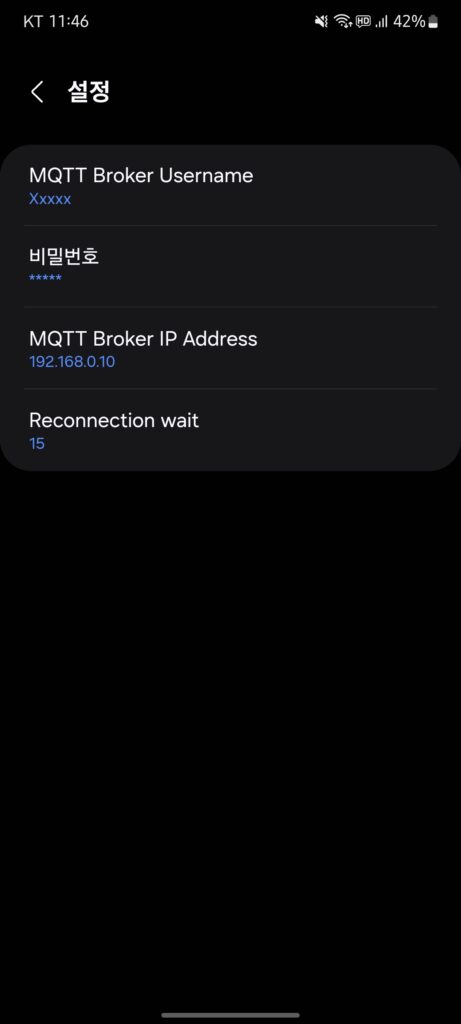
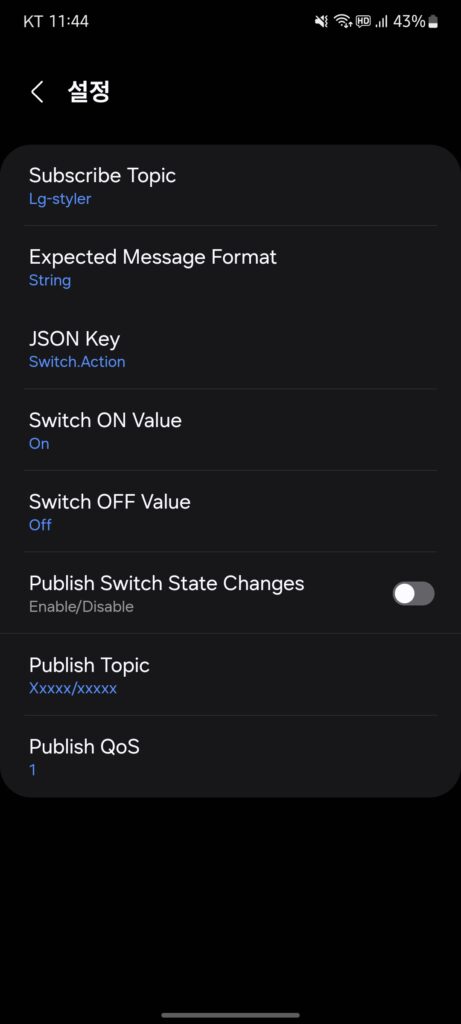
그리고 MQTT 가상 스위치를 생성할 수 있는데 토픽은 “lg-styler”로 명명하고 스위치의 ON / OFF 값을 on / off로 설정해주었습니다.
6. 코드 작성 및 자동화 구성
이제 thinqconnect를 통해 LG 장치 정보를 받아와서 MQTT로 보내주는 코드를 작성해봅시다.
import asyncio
from datetime import datetime
from aiohttp import ClientSession
from thinqconnect.thinq_api import ThinQApi
import paho.mqtt.client as mqtt

broker_address = 'localhost'
broker_port = 1883
client_id = 'str(uuid.uuid4())로 생성'

async def checkDevice(client_id):
    POWER_ON_Check = False
    async with ClientSession() as session:
        try:
            thinq_api = await ThinQApi(session = session, access_token = '토큰', country_code = 'KR', client_id = client_id)

            # 디바이스 목록을 받아 옴
            response = await thinq_api.async_get_device_list()
            devices_list = response
            print(devices_list)

            if devices_list != None:

                try:
                    print('[+] 스타일러')
                    response = await thinq_api.async_get_device_status(devices_list[0]['deviceId'])

                    if response != None:
                        #print(response['runState']['currentState'])
                        if response['runState']['currentState'] == 'POWER_OFF':
                            client.publish('lg-styler', 'off')
                        elif response['runState']['currentState'] == 'COMPLETE':
                            client.publish('lg-styler', 'off')
                        else:
                            client.publish('lg-styler', 'on')
                            POWER_ON_Check = True
                    else:
                        client.publish('lg-styler', 'off')
                except Exception as e:
                    print(datetime.now().strftime('[%Y-%m-%d-%a %H:%M:%S] ') + f"Error while checking device {devices_list[0]['deviceId']}: {e}")

                try:
                    print('[+] 세탁기')
                    response = await thinq_api.async_get_device_status(devices_list[1]['deviceId'])

                    if response != None:
                        #print(response[0]['runState']['currentState'])
                        if response[0]['runState']['currentState'] == 'POWER_OFF':
                            client.publish('lg-washer', 'off')
                        elif response[0]['runState']['currentState'] == 'END':
                            client.publish('lg-washer', 'off')
                        else:
                            client.publish('lg-washer', 'on')
                            POWER_ON_Check = True
                    else:
                        client.publish('lg-washer', 'off')
                except Exception as e:
                    print(datetime.now().strftime('[%Y-%m-%d-%a %H:%M:%S] ') + f"Error while checking device {devices_list[1]['deviceId']}: {e}")

            else:
                print(datetime.now().strftime('[%Y-%m-%d-%a %H:%M:%S] ') + '[-] Device list is NULL.')

            return POWER_ON_Check

        except Exception as e:
            print(datetime.now().strftime('[%Y-%m-%d-%a %H:%M:%S] ') + '[-] Exception : checkDevice()')
            print(e)
            await asyncio.sleep(600)

async def main():
    while True:
        POWER_ON_Check = await checkDevice(client_id)

        if POWER_ON_Check:
            await asyncio.sleep(30)
        else:
            await asyncio.sleep(600)

client = mqtt.Client(mqtt.CallbackAPIVersion.VERSION2, 'lg')
print('[+] Connect to broker')
client.connect(host=broker_address, port=broker_port)
client.loop_start()

# main 함수를 호출하여 asyncio 이벤트 루프를 관리
try:
    asyncio.run(main())
except KeyboardInterrupt:
    client.loop_stop()
    client.disconnect()
참고로 스타일러 상태값은 아래 페이지에서 확인하실 수 있습니다. https://thinq.developer.lge.com/ko/cloud/docs/thinq-connect/device-profile/styler/
그리고 crontab에 아래와 같이 추가하여 자동 실행에 추가합니다.
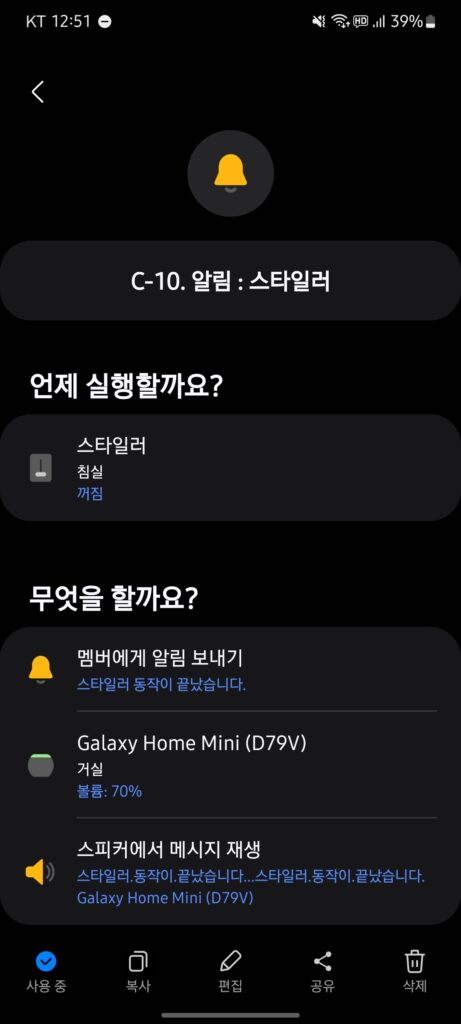
@reboot sleep 10; /home/pi/.test/bin/python /home/pi/MQTT/lg-sync.py >> /home/pi/MQTT/lg-sync.log 2>&1마지막으로 자동화를 추가 합니다. 저의 경우 스타일러 작동이 끝나면 스피커에서 안내 멘트가 나오도록 설정하였습니다.
7. thniqconnect 에러 관련
thniqconnect 모듈은 주기적으로 업데이트 중에 있으며 코드 또한 변경중에 있습니다. 제가 겪었던 에러는 아래와 같이 해결했으니 참고하시기 바랍니다.
1. ImportError: cannot import name ‘StrEnum’ from ‘enum’
File "/home/pi/.venv/lib/python3.9/site-packages/thinqconnect/devices/const.py", line 1, in <module>
    from enum import StrEnum, auto
ImportError: cannot import name 'StrEnum' from 'enum' (/usr/lib/python3.9/enum.py)
Python 3.11 버전 이하면 아래와 같이 strenum 모듈을 설치하고 코드를 수정해주면 됩니다.
pi@raspberrypi:~/MQTT $ pip install strenum
Looking in indexes: https://pypi.org/simple, https://www.piwheels.org/simple
Collecting strenum
  Using cached https://www.piwheels.org/simple/strenum/StrEnum-0.4.15-py3-none-any.whl (8.9 kB)
Installing collected packages: strenum
Successfully installed strenum-0.4.15
# /home/pi/.venv/lib/python3.9/site-packages/thinqconnect/devices/const.py
-from enum import StrEnum, auto
+from enum import auto
+from strenum import StrEnum참고 : https://stackoverflow.com/questions/75040733/is-there-a-way-to-use-strenum-in-earlier-python-versions
2. TypeError: unsupported operand type(s)
File "/home/pi/.venv/lib/python3.9/site-packages/thinqconnect/devices/washcombo.py", line 25, in WashcomboDevice
    async def set_washer_operation_mode(self, operation: str) -> dict | None:
TypeError: unsupported operand type(s) for |: 'type' and 'NoneType'
# /home/pi/.venv/lib/python3.9/site-packages/thinqconnect/devices/washcombo.py
+import typing
-async def set_washer_operation_mode(self, operation: str) -> dict | None:
+async def set_washer_operation_mode(self, operation: str) -> typing.Union[dict, None]:참고 : https://stackoverflow.com/questions/69440494/python-3-10-optionaltype-or-type-none
8. 참고
thinqconnect 모듈 관련 네이버 카페 소개글 https://cafe.naver.com/stsmarthome/90711 https://cafe.naver.com/stsmarthome/90747 https://cafe.naver.com/stsmarthome/90783
답글 남기기